 GIFFrame
Drop your images here将图片拖到这里
JPG, PNG or WebP · Processed on your deviceJPG、PNG 或 WebP · 在设备上处理
An image to gif converter is useful when a set of still pictures tells a story better as a loop. Add JPG, PNG, or WebP files, arrange the frames, choose how long each picture stays visible, and export a GIF for a post, product demo, chat, or presentation. The tool works with one image too: the result is a valid one-frame GIF, while two or more different images create visible motion. Your frames are prepared in the browser, so you can check the animation before downloading it.用图片转 GIF 工具,把 JPG、PNG 或 WebP 静态图片组合为循环动画。选择素材后,可以在时间轴调整顺序,为说明画面多留一点阅读时间,再导出用于产品演示、聊天或演示文稿的 GIF。单张图片会生成单帧文件;两张或更多不同图片才能呈现可见变化。整个制作过程在浏览器中完成,下载前可以先检查帧顺序、尺寸和播放节奏。
JPG, PNG or WebP · Processed on your deviceJPG、PNG 或 WebP · 在设备上处理
An image to gif project begins with a list of still images rather than a video track. GIFFrame places those images on a shared canvas sized to the largest uploaded frame, then centers each picture so a change in aspect ratio does not move the whole composition unexpectedly. The timeline makes the sequence visible before export, which is helpful for a numbered tutorial, a before-and-after comparison, or a simple photo loop. Reordering is part of the edit, not a separate upload step. If the loop feels too quick or too slow, adjust the frame delays and preview again before saving.图片转 GIF 项目从一组静态图片开始,而不是视频轨道。GIFFrame 会按照上传图片中最大的画布建立统一尺寸,再让每张图片居中放置,避免宽高比不同导致画面位置突然跳动。导出前,时间轴会展示完整顺序,适合制作编号教程、前后对比或简单照片循环。调整顺序属于编辑过程,不需要重新上传。如果循环过快或过慢,可以修改帧停留时间,再次预览后保存。
The converter accepts common JPG, PNG, and WebP pictures, so screenshots, photographs, interface mockups, and exported illustrations can share one sequence. A single uploaded picture becomes a one-frame GIF: it can be useful when a destination requires GIF format, but it will not appear animated because there is no second frame to create a change. For visible movement, use at least two images with a meaningful difference between them. Keep important text inside the same approximate area from frame to frame, especially when the result will be read on a small phone or chat preview.转换器支持常见的 JPG、PNG 和 WebP 图片,因此截图、照片、界面草图和导出的插画都可以放在同一组序列中。上传单张图片会生成单帧 GIF:当目标平台要求 GIF 格式时它很有用,但由于没有第二帧制造变化,画面不会看起来在动。要产生可见运动,至少上传两张有明显差异的图片。重要文字最好在每一帧中保持大致相同的位置,尤其是要在手机或聊天预览的小画面中阅读时。
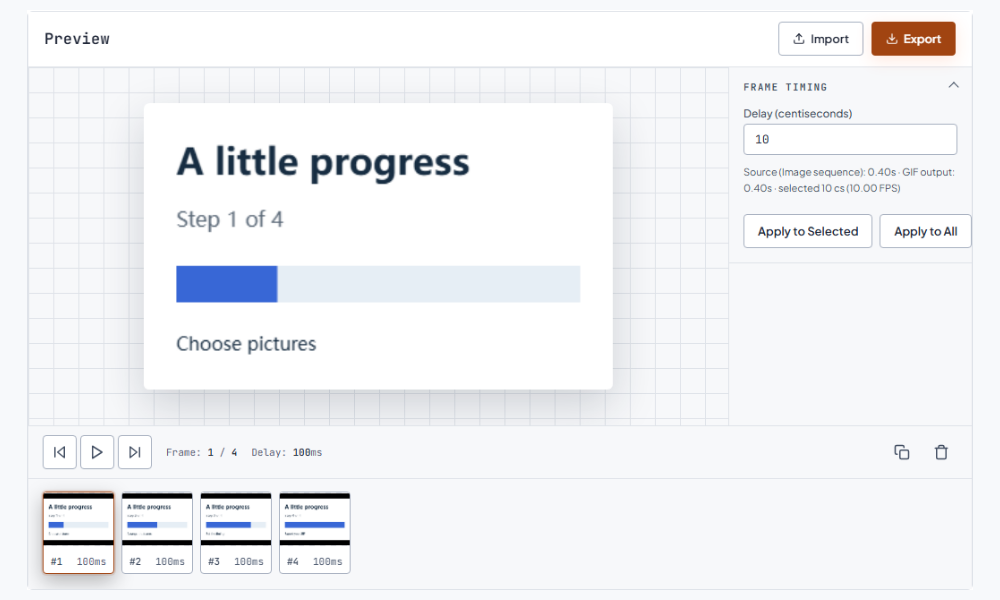
An image to GIF sequence works well for a short product walkthrough, a cursor moving between interface states, a recipe step-by-step, or a visual progress update. It also gives social posts a compact loop when the source material is a handful of photos rather than a recorded clip. For a tutorial, use a slightly longer delay on frames containing labels or instructions; for a reaction or decorative loop, a shorter and even delay usually feels more natural. The useful question is not how many pictures you can add, but whether every frame advances the idea. Removing repeated frames often makes the message clearer and the final file lighter. Continue with the GIF speed changer.图片转 GIF 序列适合制作简短的产品演示、在界面状态之间移动的光标、菜谱步骤或视觉进度更新。当素材是几张照片而不是录制好的片段时,它也能为社交帖子提供紧凑循环。教程中的说明帧可以设置稍长的停留时间;反应图或装饰性循环通常适合更短且一致的时间。关键不在于能添加多少张图片,而在于每一帧是否推进了表达。删除重复帧往往能让信息更清晰,也让最终文件更轻。 接下来可以使用调速。
Timing controls how long a picture remains on screen. A delay of 0.10 seconds is one tenth of a second, while 100 centiseconds is one second. Apply one value to every frame when the sequence should feel even; edit individual frames when a title, key step, or final result deserves a pause. Check the first and last frame together because a loop jumps directly from the end back to the beginning. A matching visual position makes that transition feel intentional. If motion appears to stutter, first check that adjacent images really differ and that the delay is not so short that the change is hard to see. Continue with the GIF size reducer.时间设置决定每张图片在屏幕上停留多久。0.10 秒是十分之一秒,100 个百分之一秒就是一秒。当序列需要均匀节奏时,可以把一个时间值应用到所有帧;如果标题、关键步骤或最终结果需要停顿,则单独编辑对应帧。要把第一帧和最后一帧放在一起检查,因为循环会直接从结尾跳回开头。相近的画面位置会让这个转场更自然。如果动画看起来卡顿,先确认相邻图片确实不同,并检查停留时间是否太短而难以看清变化。 接下来可以使用压缩。
GIF uses an indexed color palette, so a photographic image to gif conversion may simplify gradients, shadows, or subtle color differences. Large dimensions and many near-identical frames also increase the exported file size. Start with the dimensions your audience needs, crop empty margins in the source images, and avoid adding frames that do not change the story. After export, open the saved file at its intended display size and watch a full loop. If a platform rejects the result, reduce the canvas or remove redundant frames before trying more aggressive compression. Keeping the original JPG, PNG, or WebP files makes later timing and size changes easier.GIF 使用索引色调色板,因此把照片转换成 图片转 GIF 后,渐变、阴影或细微色差可能会被简化。较大的尺寸和大量几乎相同的帧也会增加导出文件的大小。开始制作前,应按照受众需要设定尺寸,裁掉原图中的空白边缘,并避免加入不会推动故事的帧。导出后,要在实际显示尺寸下打开文件并完整观看一轮。如果平台拒绝该文件,可以先缩小画布或删除重复帧,再尝试更强的压缩。保留原始 JPG、PNG 或 WebP,之后更容易重新调整时间和尺寸。
An image to GIF workflow suits a designed set of screenshots, slides, or selected photos when you want control over every frame. Arrange the pictures, set delays, and export. A drawing or animation application is a better starting point when you need to create intermediate poses, add illustrated motion, or design layers before exporting your frames. GIFFrame assembles the pictures you supply. Prepare each visual state in your preferred design application, export the stills in sequence, and use the timeline here to decide how those states play together. This keeps visual design and frame timing easy to adjust independently.需要控制每一帧的截图、幻灯片或精选照片,适合先用图片合成 GIF:排列图片、设置停留时间并导出。如果要绘制中间动作、制作图层或设计运动轨迹,可以先在绘画或动画软件中准备各个画面,再按顺序导出静态图。GIFFrame 会组合你提供的图片,让你在时间轴上决定这些画面怎样连续播放。把画面设计和播放节奏分开处理,后续调整会更方便。
Before sharing, preview the GIF where people will actually see it: a narrow chat card, a social feed, or a presentation slide. A readable loop has enough contrast, a clear first frame, and a duration that lets the viewer understand the change. If the animation is for a chat app, keep the most important action near the center and test the final dimensions on a phone. If it is for a product page, a shorter loop usually communicates faster and avoids visual fatigue. A finished image to GIF file is only the delivery copy; keep the source frames so you can make a lighter, slower, or differently ordered version later.分享前,要在受众真正看到 GIF 的位置进行预览:窄聊天卡片、社交信息流或演示文稿页面。易读的循环需要足够对比度、清晰的第一帧,以及让观众理解变化的持续时间。如果用于聊天应用,应把最重要的动作放在画面中央,并在手机上测试最终尺寸。如果用于产品页面,较短的循环通常传达更快,也不容易造成视觉疲劳。完成的 图片转 GIF 文件只是交付版本;应保留源图片,方便之后制作更轻、更慢或顺序不同的版本。
One picture can be exported as a valid one-frame GIF, but it cannot show motion by itself. Add at least two images with a visible change when you need an animated loop.一张图片可以导出为有效的单帧 GIF,但它本身不会产生运动。需要动画循环时,请至少加入两张存在可见变化的图片。
Upload the JPG, add any other frames in the order you want, choose the timing, preview the result, and export. A single JPG creates a one-frame file.上传 JPG,按需要加入其他帧并排列顺序,设置停留时间,预览结果后导出。只上传一张 JPG 时,会生成单帧文件。
GIFFrame accepts JPG, PNG, and WebP images for the image to gif workflow. Use the same general canvas size when possible to reduce unexpected movement between frames.GIFFrame 的 图片转 GIF 工作流支持 JPG、PNG 和 WebP。条件允许时,尽量使用接近的画布尺寸,以减少帧之间不必要的画面移动。
Move or share the photos to the device where you open GIFFrame, select the JPG, PNG, or WebP copies together, then arrange and time them in the browser.将照片传到打开 GIFFrame 的设备,或先分享为 JPG、PNG、WebP 文件,再在浏览器中一起选择、排列并设置时间。
This tool assembles pictures you provide. To turn an AI-created sequence into a GIF, first save its individual pictures as JPG, PNG, or WebP, then arrange them here and set the frame timing.这个工具会组合你提供的图片。若已获得 AI 生成的一组连续画面,请先保存为 JPG、PNG 或 WebP,再在这里排列并设置帧时间。