 GIFFrame
Drop a GIF here将 GIF 拖到这里
Processed on your device在设备上处理
Need a reaction, reveal, or loop to travel the other way? This gif reverser changes the order of an imported animation’s frames, keeps each frame’s delay with the image it belongs to, and lets you preview the result before exporting. A forward action such as opening, filling, or assembling can become a closing, emptying, or unbuilding motion. Use the timeline to spot the new first frame and check the loop seam before you save the reversed GIF.想让反应、揭示或循环动作朝相反方向播放?这个 GIF 倒放工具会重新排列导入动画的帧,并让每一帧的停留时间跟着所属画面移动,再导出前预览结果。打开、填满或组装等正向动作,可以变成关闭、清空或拆解。操作后先观察新的第一帧,并检查循环衔接,再保存倒放后的 GIF。
Processed on your device在设备上处理
An animated GIF is a timed sequence, so reversing it means changing picture order, not rotating or mirroring the canvas. If the timeline is A, B, C, D, the result starts D, C, B, A. The new first thumbnail is the source’s last frame. This is useful for a reveal that should disappear, an object that should return, or a drawing that should erase itself.动画 GIF 是一组带时间的画面,因此倒放改变的是图片顺序,并不是旋转或镜像画布。如果时间轴原本是 A、B、C、D,结果就会从 D、C、B、A 开始。新的第一张缩略图就是原文件的最后一帧。这个效果适合让揭示内容消失、让物体返回,或让逐渐完成的图画自行擦除。
Each frame keeps its own delay when the sequence is reversed. A source ending with a deliberate pause therefore begins the reversed loop with that pause. After clicking Reverse frames, select the new first thumbnail and press Play. Watch the join from the final reversed frame back to the new first frame; the transition is easier to judge while the animation is moving than from one paused image.反转顺序时,每一帧仍保留自己的停留时间。因此,原片结尾的刻意停顿会随最后一帧移动到倒放循环的开头。点击 Reverse frames 后,选中新第一帧并点 Play。要观察新的循环接点,应让动画连续播放;相比只看一张暂停画面,运动中的衔接更容易判断。
Use a gif reverser for actions with a clear start and finish: a lid opening, a hand placing an item, a progress bar filling, confetti falling, or a shape growing. The backward version can become an undo, reset, or transformation without rebuilding every picture. Keep the original for the forward response and export the reversed copy for the return action.GIF 倒放适合起点和终点清楚的动作,例如打开盖子、把物品放下、进度条填满、彩纸落下或形状变大。反向版本可以成为撤销、复位或变形效果,不必重新绘制每一张图片。保留正向原文件,再导出倒放副本,就能分别用于进入和返回的动作。
For a thumbnail or article image, choose a source whose first and last frames are easy to recognize. A reversed GIF that starts on the completed result communicates quickly, while a neutral opening can create a smoother loop. If the animation expands and contracts symmetrically, the result may look unchanged; compare its first and last thumbnails rather than a single paused frame.制作缩略图或文章配图时,最好选择首尾画面差异明显的素材。倒放后从完成结果开始的 GIF 能更快传达主题,而中性的开头更容易形成平滑循环。如果动画本来就是对称地放大再缩小,倒放结果可能看起来没有变化;应比较倒放前后的第一帧和最后一帧,而不是只看一张暂停画面。
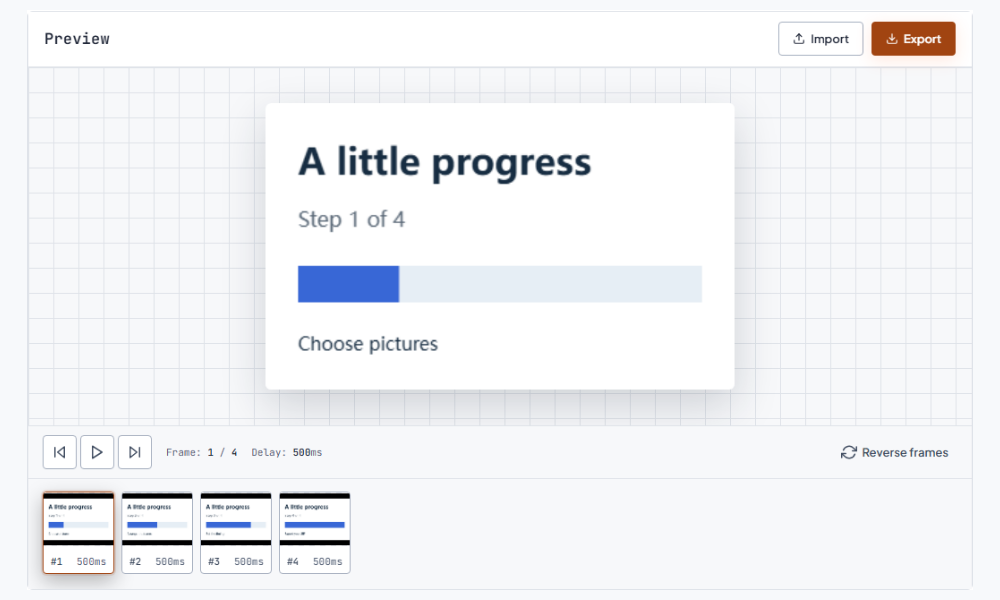
Reversing and bouncing are different workflows. A reversed GIF plays the full sequence in the opposite direction once per loop: D, C, B, A. A bounce loop plays forward and then backward, so it contains both A, B, C, D and D, C, B, A. Use the reverser when the finished file should stay backward; assemble both directions when the action should travel out and return.倒放和往返播放是两种不同的流程。倒放 GIF 每轮都只按相反方向播放完整序列:D、C、B、A。往返循环则先正向播放,再反向播放,因此同时包含 A、B、C、D 和 D、C、B、A。成品需要始终反向播放时使用倒放工具;动作要出去再回来时,则要准备两个方向的序列。
Speed is a separate decision. Reversal changes order, while a speed change alters how long frames remain visible. If the opening pause feels distracting, inspect that frame’s delay in the advanced editor, or open the GIF speed changer to retime the whole sequence while keeping the reversed order. Preview a complete loop at the size where people will see it, because chat playback can make timing feel different.播放速度是另一项决定。倒放改变顺序,调速则改变每帧停留多久。如果开头停顿太明显,先在高级编辑器查看那一帧的延迟,或打开 GIF 调速工具调整整段时间,同时保留倒放顺序。应在读者实际观看的尺寸下完整预览一轮,因为聊天窗口中的播放节奏可能与编辑器里不同。
Before exporting, compare the original and reversed versions at the first, middle, and final moments. Check text, faces, arrows, and gestures: reversing an action also reverses when the reader encounters them. If a label is only readable at the source’s end, it now appears at the beginning. Keep the original beside the new export so you can return to the forward version without another conversion.导出前,在开头、中段和结尾分别比较原文件与倒放版本。检查文字、面部、箭头和手势,因为动作反转也会改变读者看到这些信息的先后。如果标签只有在原片结尾才清晰,倒放后它会出现在开头。把原文件和新导出文件放在一起,之后就能直接回到正向版本。
Use Export after the new order looks right, then open the saved GIF outside the editor and let it complete a full loop. Check the seam, opening delay, and any detail that carries meaning. If you need individual pictures rather than motion, send the result to the GIF frame extractor and choose stills from its numbered PNG archive.确认新顺序合适后使用 Export,再在编辑器之外打开保存的 GIF,完整播放一轮。检查循环接点、开头停顿,以及承载信息的细节。如果需要的是单张画面而不是连续动作,可以把结果交给 GIF 帧提取工具,再从带编号的 PNG 压缩包中挑选静帧。 接下来可以使用提取帧。
Choose an animated GIF, wait for the timeline to load, and click Reverse frames. Play from the new first thumbnail to check the motion and loop join, then select Export. The saved file contains the same canvas with the frame order reversed, so you can share it or continue editing it.选择一个动画 GIF,等待时间轴加载后点击 Reverse frames。从新的第一张缩略图开始播放,检查动作和循环接点,再点击 Export。保存的文件保留原来的画布,只改变帧顺序,因此可以直接分享,也可以继续编辑。
The delay stays with its frame as that frame moves to a new position. If the original last image pauses for a second, the reversed animation begins with that pause. Use the timeline to spot an unexpectedly long opening, then adjust that pause in the advanced editor before exporting a final version.帧移动到新的位置时,停留时间仍跟着该帧。如果原来的最后一张图停留一秒,倒放动画就会从这段停顿开始。通过时间轴找出意外变长的开头,再在高级编辑器中调整这一帧的时间,然后导出最终版本。
A symmetric animation can look the same in either direction, and a single-frame GIF has no motion to reverse. Compare the first and last thumbnails before and after the action. A source with directional movement, changing labels, or clearly different start and finish makes the new order easier to see.对称动画从两个方向播放可能都一样,单帧 GIF 也没有可反转的运动。可以比较操作前后的第一帧和最后一帧。带有明确移动方向、不断变化的标签,或首尾差异明显的素材,更容易看出新顺序。
No. Reversal produces one backward pass. A boomerang or ping-pong loop needs a forward pass followed by a backward pass, with both directions in the sequence. Build that two-way sequence in the editor when you want an action to travel out and return; use this tool when the final file should play backward throughout.不能直接制作。倒放只会生成一段反向播放。往返循环需要先正向、再反向,并在序列中包含两个方向。需要动作出去再回来时,应在编辑器中准备双向序列;如果成品需要从头到尾反向播放,就使用本工具。