 GIFFrame
Drop a GIF here将 GIF 拖到这里
Processed on your device在设备上处理
A GIF frame extractor turns a moving animation into still pictures you can inspect, reuse, and arrange. Open a GIF to see its timeline, then download all frames as numbered PNG images in one ZIP archive. This is useful for choosing a clear screenshot, studying a motion sequence, or preparing pictures for a new animation. Each exported image shows a composed frame, so you can work with the visible picture rather than an isolated change. Your GIF is processed locally in the browser.GIF 帧提取工具可以把动画拆成静态图片,方便检查、复用和重新排列。打开 GIF 后,时间轴会展示各帧;点击导出即可下载包含全部编号 PNG 的 ZIP。你可以从中挑选截图、观察动作过程,或把图片用于新的动画。导出的图片对应完整合成帧,便于直接查看画面。文件处理在本地浏览器中完成。
Processed on your device在设备上处理
The GIF frame extractor saves the displayed composition for each moment in an animation. Some GIF files store only changing regions between frames, but those partial updates are not convenient as standalone pictures. Composed PNG output gives you a full canvas to inspect or reuse. This matters when a moving object crosses a static background: each still should show the object and its surroundings together. Compare a few extracted images with the preview to understand where the meaningful changes occur. The number of output pictures follows the animation frames, including frames that may look similar at a quick glance.工具导出的是动画每个时刻的合成画面。有些 GIF 文件只保存相邻帧之间变化的局部区域,这些局部数据不适合直接当图片使用。合成后的 PNG 提供完整画布,移动物体和周围背景可以一起查看。解压后可将几张图片与预览对照,找出动作变化的位置。输出图片数量对应动画帧数,其中也可能包含快速浏览时看起来相似的画面。
Use a GIF frame extractor when the exact moment matters more than the moving loop. A designer can compare successive poses, a support writer can choose the clearest interface state, and a presentation author can select a still that reads well beside a caption. Inspect the timeline before downloading if you are looking for one expression or action. Note its approximate position, then find the matching numbered PNG after extraction. This workflow gives you the source frame resolution, whereas capturing the screen can include browser scaling, interface elements, or an inconvenient point between the pictures you wanted.当需要准确画面而非完整循环时,拆帧尤其有用。设计师可以比较连续姿态,帮助文档作者可以选择清楚的界面状态,演示文稿作者则能挑选适合配文字的静态图。寻找某个表情或动作时,先在时间轴记下大致位置,下载后再查对应编号。直接提取保留源帧分辨率,也能避开屏幕截图带来的浏览器缩放、界面元素或时机不准问题。
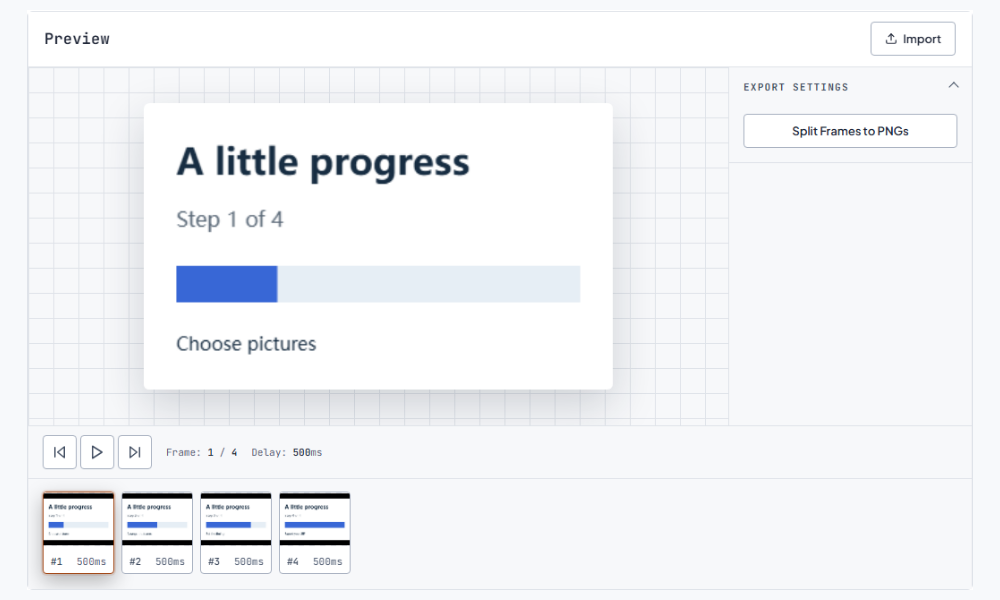
The PNG files are numbered so their names preserve the original frame order. Sort by filename when browsing the extracted folder, and keep those names while comparing consecutive frames. A folder view sorted by modification time or file size can make the animation appear out of sequence. When sending the pictures to another person, share the whole ZIP or preserve the numbered filenames in the folder. If you rename selected images for a document, keep a separate untouched copy of the sequence. That small separation makes it easier to find a source frame again or build a second version later.PNG 使用编号保存原有帧顺序。浏览解压文件夹时,请按文件名排序;按修改时间或体积排序可能打乱动作顺序。与他人共享时,可以直接发送 ZIP,或保留文件夹中的编号名称。如果为了文档需要重命名某些图片,建议另存副本,同时留下一套未改动的序列。这样后续查找原帧或重新制作其他版本会更方便。
After extracting a GIF, select the pictures that advance your explanation and import them into the image maker. You can keep a few key states for a short tutorial or remove repeated frames from a decorative loop. Arrange the chosen images in the new timeline and set their delays before exporting. The ZIP contains pictures, not a timing project or a delay sidecar, so note important pauses from the original if you want to recreate its pacing. Choosing fewer pictures changes the motion; preview the new sequence to check that the missing transitions do not make the action confusing. Continue with the image to GIF.拆帧后,可以挑选有助于表达的图片,再导入图片制作工具。简短教程可只保留几个关键状态,装饰循环则可移除重复帧。重新排列后,需要再次设置停留时间。ZIP 保存图片,不包含时间工程或延迟信息文件;若要复现原来的节奏,应另外记录重要停顿。减少画面会改变动作连续性,因此导出前要确认缺少的过渡不会影响理解。 接下来可以使用图片转 GIF。
A screen capture is convenient when you need the animation as it appears inside a particular page or message. A GIF frame extractor is more suitable when you need the actual animation images, a full sequence, or a frame without surrounding interface. PNG is useful for editing because the output remains a still image that common design applications can open. Extracting does not add detail beyond the original canvas, so enlarging a tiny source will still make its pixels more visible. For a published screenshot, choose a representative moment and add any explanatory caption in your document or design application.如果需要保留动画所在网页或消息的整体效果,屏幕截图更方便。如果需要动画本身、完整序列或去掉周围界面的画面,则更适合拆帧。PNG 可直接在常见设计软件中打开。提取不会增加原画布之外的细节,因此放大小尺寸原件仍会看到像素。用于正式文档时,可以先挑选代表性画面,再在文档或设计软件中添加说明。
Open the archive and check the first, middle, and last pictures. Look for the expected canvas size, the correct subject position, and any transparent regions you intend to reuse. Similar-looking pictures can be valid frames with small changes or deliberate pauses; inspect them before deleting anything. If your goal is a backward animation rather than still images, use a reversal workflow directly and keep the frames with their delays together. Extracting is most valuable when the next task needs individual pictures. Keep the original GIF alongside the PNG sequence for playback and timing reference. Continue with the GIF reverser.解压后先检查开头、中间和结尾的图片,确认画布尺寸、主体位置和透明区域符合预期。相似画面可能具有细小动作差异,也可能用于停顿,请查看后再决定是否删除。如果目的只是制作倒放动画,可以直接使用倒放工具,让帧和停留时间一起反转。拆帧最适合后续工作确实需要单张图片的情况。建议同时保留原 GIF,作为播放和时间参考。
The download exports all frames together. Inspect the timeline, download the ZIP, and keep the numbered PNG that matches the moment you want.下载会导出全部帧。先查看时间轴,下载 ZIP 后再保留对应时刻的 PNG。
The ZIP contains numbered PNG images without a timing sidecar. Record the original delays separately when you need to reconstruct the same pacing.ZIP 包含编号 PNG,不带帧时间信息文件。需要重建相同节奏时,请另外记录原帧延迟。
Yes. Import your selected PNG files into the image-to-GIF page, arrange them, and choose the new delays before export.可以。把选中的 PNG 导入图片转 GIF 页面,排列顺序并重新设置停留时间后导出。